ANATOMY OF THE THYROID AND PARATHYROID GLANDS
Location and Dimensions
- Thyroid Gland
- Situated between the larynx and trachea medially, and the carotid sheath and sternocleidomastoid muscles laterally.
- Weighs approximately 15–25 g.
- Lateral Lobes: ~3–4 cm long and 1.5–2 cm wide.
- Isthmus: ~1.2–2 cm long, ~2 cm wide, crossing the trachea between the first and second rings.
- Typically asymmetric (right lobe often larger or extends higher).

Surgical Exposure of the Neck Structures
- Superficial Layer
- Skin, subcutaneous fat, and platysma muscle can be reflected as flaps for wide exposures.
- External and anterior jugular veins and transverse cervical nerves run within this superficial layer.
- Deeper Exposure
- The sternocleidomastoid muscle, omohyoid muscle, sternohyoid, and sternothyroid muscles lie beneath.
- Ansa hypoglossal nerve (motor to infrahyoid muscles) courses near the carotid sheath. Preserving it helps maintain swallowing function.
- Anterior Jugular Veins
- Supplement venous return from pharynx/upper neck.
- Important to retract (rather than divide) these vessels during thyroid/parathyroid exposure to reduce postoperative edema of the neck/larynx.
- Facial Nerve Branches (Lower Divisions)
- Injury to the marginal mandibular branch can cause drooping of the lower lip on that side (no spontaneous regeneration).
- Midline Lymph Node
- A solitary node can be found just in front of the thyroid isthmus, between pretracheal muscles.
- Enlarged in pharyngitis or laryngitis, but not typically in thyroiditis or tracheitis.
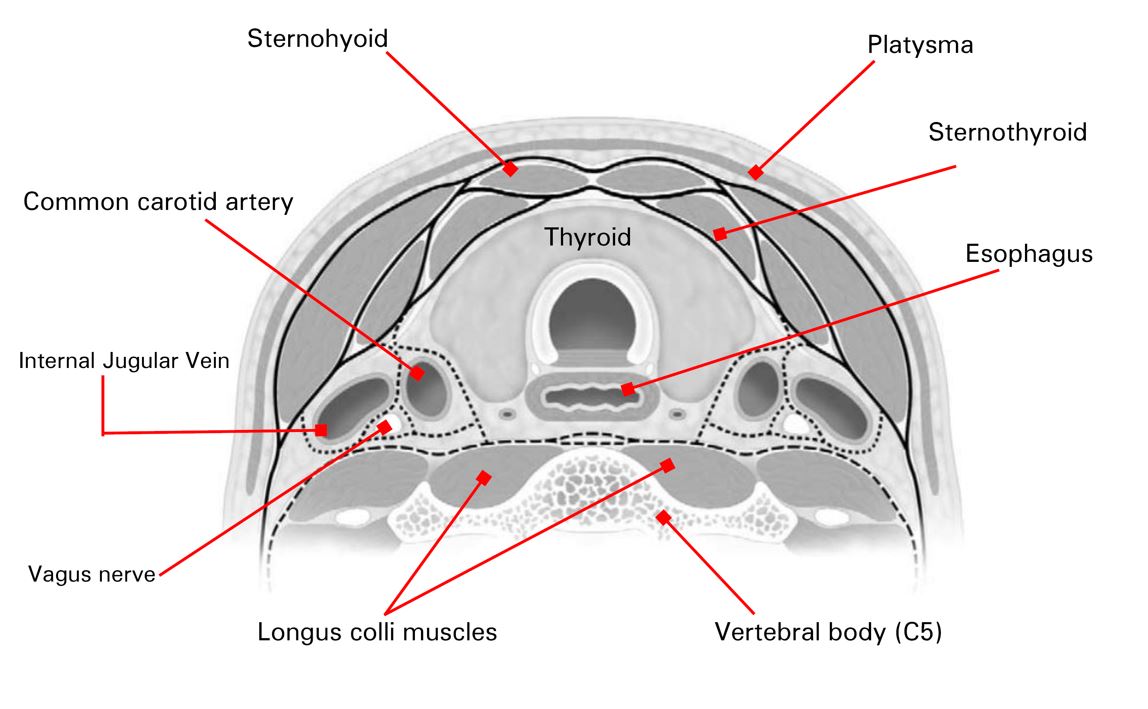
Relation to the Esophagus
- The esophagus often lies slightly to the right of midline, adjacent to the typically larger right thyroid lobe.
Exposure of Thyroid, Parathyroid, and Thymus
- Achieved by retracting or transecting pretracheal (infrahyoid) muscles.
- Maximum exposure sometimes requires a transverse cut of these muscles to reflect them superiorly and inferiorly.
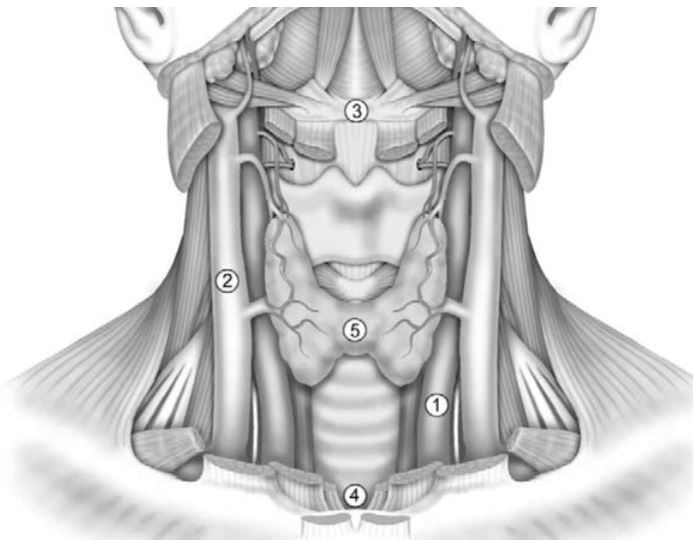
THYROID GLAND: ADDITIONAL DETAILS AND ANOMALIES
- Shape and Position
- Usually shaped like a horseshoe (“U” or “H”) with two lateral lobes connected by an isthmus.
- Right lobe often larger; in dextrocardia, the left lobe may be larger.
- Common Developmental Variations
- Pyramidal Lobe (~15% of people): Extends upward from the isthmus; may enlarge with goiter or be a site of neoplasia.
- Accessory Thyroid Tissue (≥5%): Small nodules separate from main thyroid; can mimic a tumor on exam.
- Isthmus Agenesis (<1%): Medial aspects of lobes may feel like separate nodules.
- Partial Lobe Absence (rare): Often involves lower half of a lobe.
- Ectopic Thyroid (lingual thyroid, substernal thyroid).
- Complete Agenesis: Extremely rare; usually discovered postnatally when congenital hypothyroidism develops.
PARATHYROID GLANDS
- Number and Typical Location
- Usually four (two upper, two lower), located on the posterior surface of the thyroid lobes.
- Each parathyroid has its own capsule but is attached to the back of the thyroid’s proper capsule.
- Upper Parathyroid Glands
- More constant in position, often slightly larger.
- Lie near the upper thyroid pole to the region of the inferior thyroid artery.
- Lower Parathyroid Glands
- More variable in location (can be found from upper thyroid region to anterior mediastinum).
- Embryologically associated with the thymus descent.
- Surgical Relevance
- A fifth parathyroid gland may exist, especially important if searching for hyperparathyroidism sources (e.g., adenoma or hyperplasia).
LYMPHATIC DRAINAGE OF THE THYROID REGION
- Anterior Midline Nodes
- Delphian Node: Above the thyroid isthmus, in front of the cricoid cartilage; may be palpable if enlarged (e.g., thyroid cancer, Hashimoto thyroiditis).
- Pretracheal Nodes: Below the thyroid isthmus, variable position.
- Lateral and Deep Cervical Nodes
- Along the lateral thyroid veins, near the recurrent laryngeal nerve, at the carotid sheath (jugular chain), and the supraclavicular fossa.
- “Sentinel” or Virchow Nodes are the low jugular nodes near the thoracic duct inlet.
LARYNGEAL MOTOR NERVES
- External Branch of the Superior Laryngeal Nerve
- Supplies the cricothyroid muscle (tenses vocal cords).
- Injury can lead to subtle voice changes or “fuzziness,” more pronounced if bilateral.
- Recurrent (Inferior) Laryngeal Nerves
- Right Recurrent Nerve: Hooks under the subclavian artery, then ascends diagonally.
- Left Recurrent Nerve: Hooks under the aortic arch, often ascending in the tracheoesophageal groove.
- Important to identify and preserve during thyroid/parathyroid surgery to avoid vocal cord paralysis.
DEVELOPMENT OF THE THYROID AND PARATHYROID GLANDS
Overview of Pharyngeal Development
- During early embryonic life (~second month), the pharynx forms from the foregut, with four pairs of pharyngeal pouches protruding laterally.
- Branchial Clefts align externally; anomalies may lead to fistulas or cysts along the neck.
Thyroid Gland Embryology
- Thyroid Diverticulum
- Appears in the midline floor of the primitive pharynx (~end of fourth week).
- Rapidly becomes bilobed; initially attached to the pharynx by the thyroglossal duct.
- Descent to Neck
- By ~seventh week, the thyroid primordium descends to the tracheal level.
- Thyroglossal Duct usually obliterates; a remnant at the tongue base is the foramen cecum.
- Residual duct segments can form thyroglossal duct cysts or ectopic thyroid tissue.
- Thyroid Follicles
- Start forming around the eighth week; contain colloid by the third month.
- Congenital Anomalies
- Lingual Thyroid: Gland remains at tongue base.
- Pyramidal Lobe: Retention of the distal thyroglossal duct.
- Absent or Hypoplastic Gland: Can result in congenital hypothyroidism if untreated after birth.
Parathyroid and Thymus Embryology
- Parathyroid Glands
- Third and Fourth Pharyngeal Pouches: Dorsal portions form parathyroid primordia.
- “Inferior” Parathyroids: Usually from third pouch, migrating caudally with the thymus.
- “Superior” Parathyroids: From fourth pouch, remain more cranial.
- Variable locations possible (e.g., mediastinal, near thymus).
- Thymus Gland
- Ventral parts of the third (and sometimes fourth) pouches.
- Descends into the superior mediastinum, merging into a bilobed structure.
- Undergoes involution after puberty, replaced largely by adipose tissue in adults.