DEVELOPMENT OF THE PITUITARY GLAND
- Two Major Components
- Adenohypophysis (Anterior Lobe): Derived from oral ectoderm.
- Neurohypophysis (Posterior Lobe): Derived from neural ectoderm of the forebrain floor.
- Formation of Rathke Pouch (Weeks 4–5 of Gestation)
- A pouch-like recess in the ectodermal lining of the stomodeum (primitive mouth).
- Grows upward to meet the undersurface of the forebrain.
- The connection between Rathke pouch and the stomodeum (craniopharyngeal canal) is usually obliterated.
- A persistent remnant can become a “pharyngeal pituitary,” which may later give rise to ectopic hormone-secreting adenomas.
- Infundibular (Neural) Outgrowth
- Develops from the floor of the third ventricle (neural ectoderm).
- Forms the infundibular process, which becomes solid except at its upper end (the infundibular recess of the third ventricle).
- Fusion and Further Differentiation
- Rathke pouch fuses with the infundibular process.
- Lumen of Rathke pouch typically obliterates, but a Rathke cleft may persist.
- Anterior Lobe (Pars Distalis) arises from Rathke pouch; Posterior Lobe (Pars Nervosa) arises from the infundibular process.
- The neurohypophysis (posterior lobe) contains axons (about 100,000 fibers) from the supraoptic and paraventricular nuclei of the hypothalamus.
- Remnants of Rathke pouch may persist at the boundary, forming small colloid cysts.
- Pars Tuberalis, Pars Intermedia
- The pars tuberalis extends from the ventral wall of the anterior lobe and encircles the pituitary stalk.
- The pars intermedia is a thin region at the interface between the anterior and posterior lobes; in humans, it often becomes interspersed with anterior lobe cells but can produce POMC and ACTH.
- The median eminence is the part of the tuber cinereum lying immediately above the pars tuberalis.
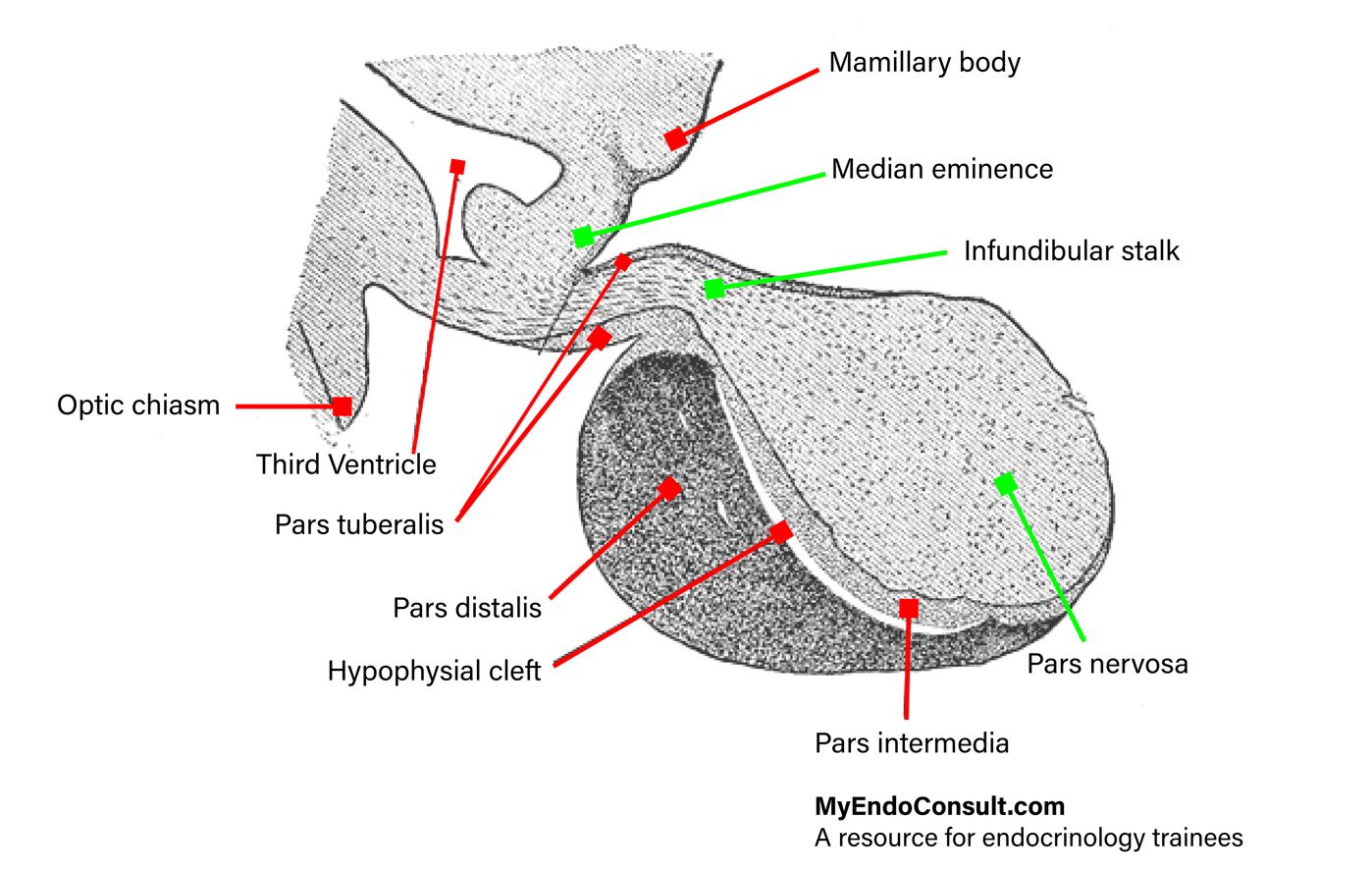
DIVISIONS OF THE PITUITARY GLAND AND RELATIONSHIP TO THE HYPOTHALAMUS
- Adenohypophysis (Anterior Lobe)
- Pars Tuberalis: Thin strip of tissue around the median eminence and upper neural stalk.
- Pars Intermedia: Thin zone posterior to any persisting cleft, in contact with the posterior lobe.
- Pars Distalis (Pars Glandularis): Main secretory portion.
- Neurohypophysis (Posterior Lobe)
- Infundibular Process (Neural Lobe)
- Infundibular Stem (Neural Stalk)
- Median Eminence (expanded upper end of the stalk/tuber cinereum)
- Pituitary Stalk
- Formed by the infundibular stem plus surrounding parts of the adenohypophysis (pars tuberalis).
- Approximately 15% of the neurohypophysis extends up the stalk into the median eminence.
- Nerve Supply (Hypothalamohypophysial Tract)
- Main functional/anatomical supply of the neurohypophysis.
- Supraopticohypophysial Tract: Arises in the supraoptic and paraventricular nuclei; runs in the anterior (ventral) wall of the stalk.
- Tuberohypophysial Tract: Arises in the dorsal/posterior hypothalamic regions, including paraventricular nucleus and tuberal/mamillary areas.
- These fibers terminate mainly in the neurohypophysis.
- Damage above the median eminence affects ~85% of the supraoptic/paraventricular neuron cell bodies; damage at the level of the diaphragma sellae affects ~70% of these cells.
- Hypothalamic Boundaries
- Anteroinferiorly bounded by the optic chiasm/tracts, posteriorly by the posterior perforated substance and cerebral peduncles, and separated from the thalamus by the hypothalamic sulcus.
- Merges anteriorly with preoptic septal region and posteriorly with the midbrain tegmentum.
- Connective Tissue Trabecula
- Separates the anterior and posterior lobes internally for a variable distance, forming part of the vascular bed.
- The embryonic cleft (Rathke pouch remnant) may persist in this trabecula, more easily seen in newborns and often disappears with age.
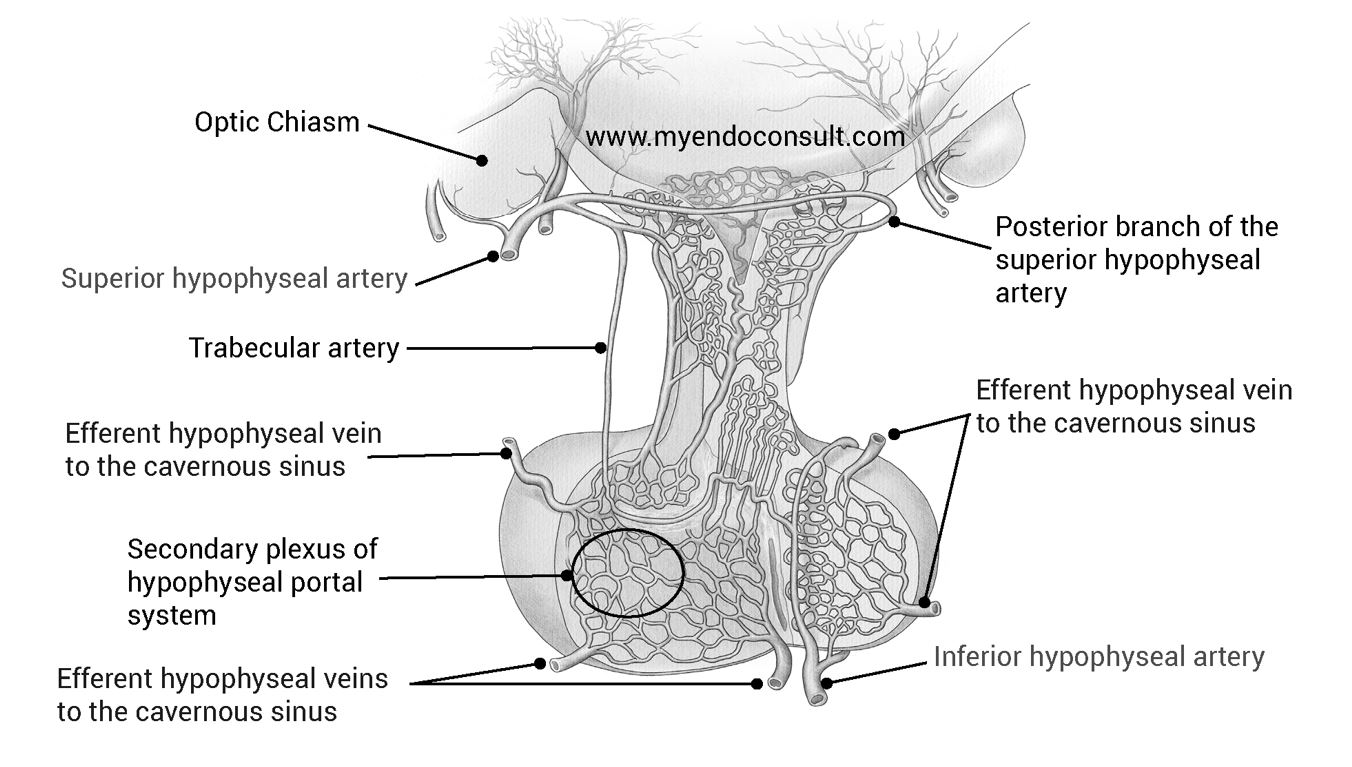
BLOOD SUPPLY OF THE PITUITARY GLAND
- Arterial Supply
- Superior Hypophysial Arteries (right and left) arise from the ophthalmic or internal carotid artery segment.
- Each divides into anterior and posterior branches to the pituitary stalk.
- Artery of the Trabecula: A branch supplying the connective tissue trabecula in the anterior lobe.
- Inferior Hypophysial Arteries (right and left) branch from the intracavernous segment of each internal carotid artery.
- Surround the infundibular process with an arterial ring.
- Supply the posterior lobe and lower infundibular stem.
- Superior Hypophysial Arteries (right and left) arise from the ophthalmic or internal carotid artery segment.
- Hypophysial Portal System
- Primary Capillary Network in the median eminence and infundibular stem receives hypothalamic releasing and inhibiting hormones from nerve endings.
- Long and Short Hypophysial Portal Veins:
- Convey blood (and hypothalamic hormones) from the primary capillary network to the secondary plexus of sinusoids in the anterior lobe (pars distalis).
- The anterior lobe has no direct arterial supply; it relies on these portal vessels.
- Venous Drainage flows from the secondary plexus into dural sinuses around the pituitary, then into general circulation.
- Occlusion of these portal vessels can lead to ischemic necrosis of the anterior pituitary.
ANATOMY AND RELATIONSHIPS OF THE PITUITARY GLAND
- Size and Position
- Reddish-gray, ovoid organ measuring ~12 mm (transverse), 8 mm (AP), 6 mm (vertical).
- Weighs ~500 mg in men and ~600 mg in women.
- Sits in the hypophysial fossa of the sphenoid bone, beneath the diaphragma sellae (a dura mater fold).
- The floor of the hypophysial fossa is part of the roof of the sphenoid sinus.
- Diaphragma Sellae
- Pierced by a small aperture for the pituitary stalk.
- Separates much of the pituitary gland from the optic chiasm.
- The subarachnoid space may extend partially into the sella (“partially empty sella”) and can allow blood or CSF to enter this space.
- Hypothalamus
- Lies superiorly, forming the floor and lateral walls of the third ventricle.
- Mamillary bodies mark the posterior limits of the hypothalamus.
- The optic chiasm lies just anterior/superior to the pituitary stalk and diaphragma sellae.
- Optic Chiasm
- A flat, quadrilateral bundle of optic nerve fibers at the junction of the anterior wall of the third ventricle with its floor.
- Rests on the diaphragma sellae behind the optic groove of the sphenoid bone.
- Pineal Gland
- A small, conical gland lying below the splenium of the corpus callosum.
- Rarely, ectopic pineal tissue can be found near the floor of the third ventricle.
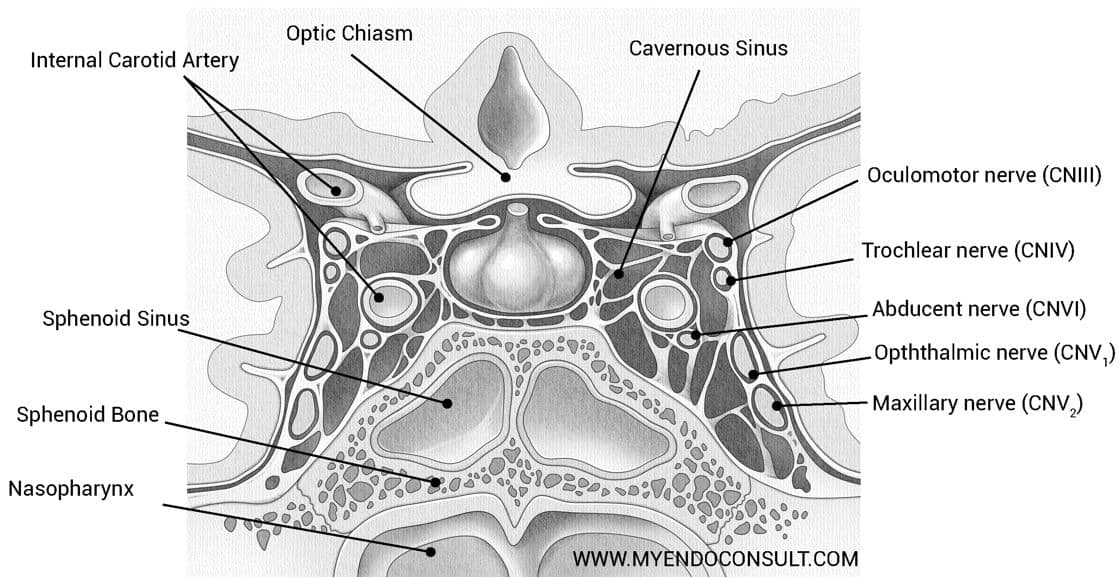
RELATIONSHIP OF THE PITUITARY GLAND TO THE CAVERNOUS SINUS
- Cavernous Sinuses
- Dural venous channels flanking the pituitary gland on each side.
- Reticulated Structure: Contains interlacing filaments around the internal carotid artery.
- Medial Wall: Internal carotid artery, abducens nerve (VI).
- Lateral Wall: Oculomotor (III), Trochlear (IV), and the ophthalmic and maxillary divisions of the trigeminal (V).
- The two cavernous sinuses communicate via anterior and posterior intercavernous sinuses, forming a circular sinus around the pituitary.
- Superior and Inferior Petrosal Sinuses
- Superior Petrosal Sinus: Connects cavernous sinus to the transverse sinus; runs in the attached margin of the tentorium cerebelli.
- Inferior Petrosal Sinus: Also connects cavernous sinus to other posterior dural sinuses.
- Internal Carotid Artery (Intercavernous Portion)
- Curves upward, forward, and then upward again through the cavernous sinus.
- Perforates the dura of the sinus roof near the anterior clinoid process.
- Surrounded by sympathetic fibers.
- Gives off hypophysial arteries to supply posterior lobe and median eminence (portal system).
RELATIONSHIPS OF THE SELLA TURCICA
- Location and Dimensions
- A deep depression in the body of the sphenoid bone.
- Normal adult dimensions:
- AP length <14 mm
- Height <12 mm (floor to a line from tuberculum sellae to posterior clinoid tip)
- Sphenoid Bone Overview
- Composed of a median body and two pairs of wings (greater and lesser), plus two pterygoid processes.
- Sphenoidal Air Sinuses: Large cavities within the body, separated by a septum (often oblique).
- Superior surface articulates with the ethmoid and frontal bones; houses grooves for the olfactory bulbs, and the chiasmatic sulcus for the optic chiasm.
- Key Features
- Tuberculum Sellae: A raised area behind the chiasmatic sulcus.
- Dorsum Sellae: Posterior boundary of the sella turcica, ending in the posterior clinoid processes.
- Hypophysial Fossa: Deepest part, housing the pituitary gland.
- Clivus: A shallow depression behind the dorsum sellae, leading to the basilar part of the occipital bone.
- Lateral aspects relate to the cavernous sinus and the foramen lacerum region.
- Nasal Relations
- The crest of the sphenoid bone and the perpendicular plate of the ethmoid.
- Surgical Considerations
- Modern pituitary approaches (microscopic or endoscopic) aim to avoid major vascular structures and the optic pathways.
- Transsphenoidal surgery exploits the sphenoidal sinus route to access the sella turcica.